nickol-knx-mcp — a design-time KNX/ETS6 assistant exposed as an MCP server, with a full demo house and a smart Home Assistant control layer.

MIT public beta · v0.8.0 Python 3.10+ Model Context Protocol

The missing ETS6 ↔ Claude
design-time layer for KNX

A design-time KNX/ETS6 assistant exposed as an MCP server. Design a project from a spec into a full implementation kit (ETS XML/CSV · report · HA YAML · test protocol · handover pack), audit & repair an existing .knxproj with concrete fix proposals, and generate the Home Assistant layer — without ever touching the live bus.

Why it exists

Two layers, one source of truth

As of 2026 there is no off-the-shelf ETS6 ↔ AI tool. This fills exactly the design-time gap — and the architecture keeps the dangerous part impossible by design.

🧠 Home Assistant
The brain — time/season/presence-aware automations, scenes, statistics. Reads real device state.
smart layer
🦾 KNX / ETS
The body — group addresses are the muscles (commands) & nerves (status/sensors). Runs autonomously.
.knxproj = truth

🔒 No bus access

Zero networking/bus libraries in the dependency tree. bus_access: false — structural, not a promise.

🧩 25 MCP tools

Validate (naming · DPT & sub-DPT · status · KNX Secure · Matter) · repair (propose fixes, not just flag) · decompose devices into GA recipes or exact vendor models · diff two versions · grade completeness · generate HA YAML, ETS XML/CSV, handover pack, test protocol & KNX IoT. All read-only — see the three scenarios ↓.

🌍 EN / DE / RU

Classifies by DPT + multilingual name keywords. Validated on ETS 4.2 / 5.0 / 5.5 / 6 fixtures, a real signed ETS6 round-trip, and a 685-GA Zennio project (false errors there: 29 → 6).

What you can do

Three scenarios, one read-only toolchain

From a blank specification to a commissioned, smart-home-connected project — or straight into an existing .knxproj that needs checking and finishing.

📐 1 · Design from a spec

Equipment list → real object models per device (a dimmer channel is 5 objects, not one GA; a floor-heating zone is 8) → the professional logic layer a bare spec never mentions: central & zone macros, scenes, presence logic, sun/wind shutters, leak→shut-off chains, astro/meteo & date-time, reserves. Out comes the full implementation kit: ETS-importable XML/CSV · report · HA YAML · acceptance test protocol · as-built handover pack. Field-checked: reconstructing a real 3,600+ GA as-built project from its spec alone → ~92% structural match, zero validation errors.

🔍 2 · Audit, repair & finish

Load any ETS5/ETS6 .knxproj (password-protected too) → analyze_all: naming · missing status objects · DPT & sub-DPT sanity · KNX Secure posture · Matter readiness. Then concrete fixes, not just flags: inferred DPTs, synthesised status GAs, absolute-brightness additions — 145 proposals on a real 3,646-GA project. Grade skeleton→as-built, diff two revisions, regenerate the report, handover pack and test protocol.

🏠 3 · The smart-home layer

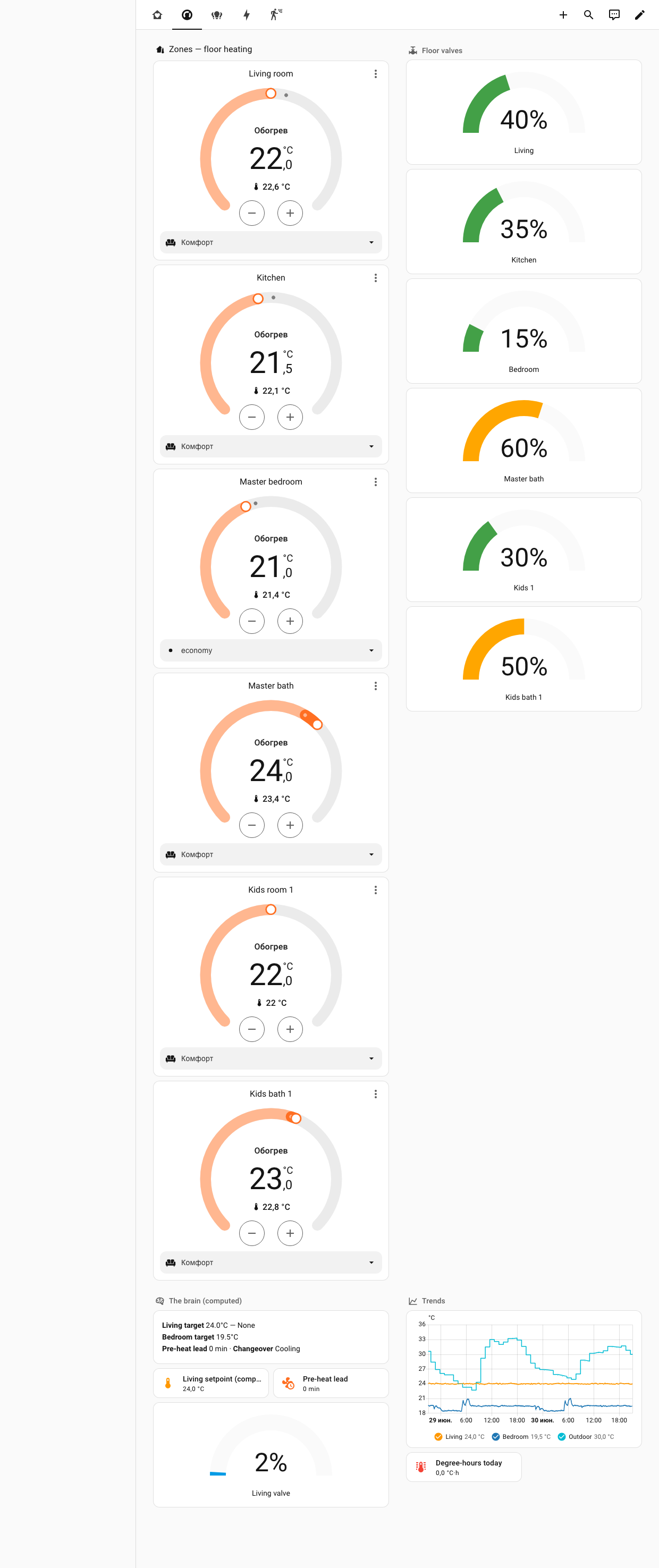
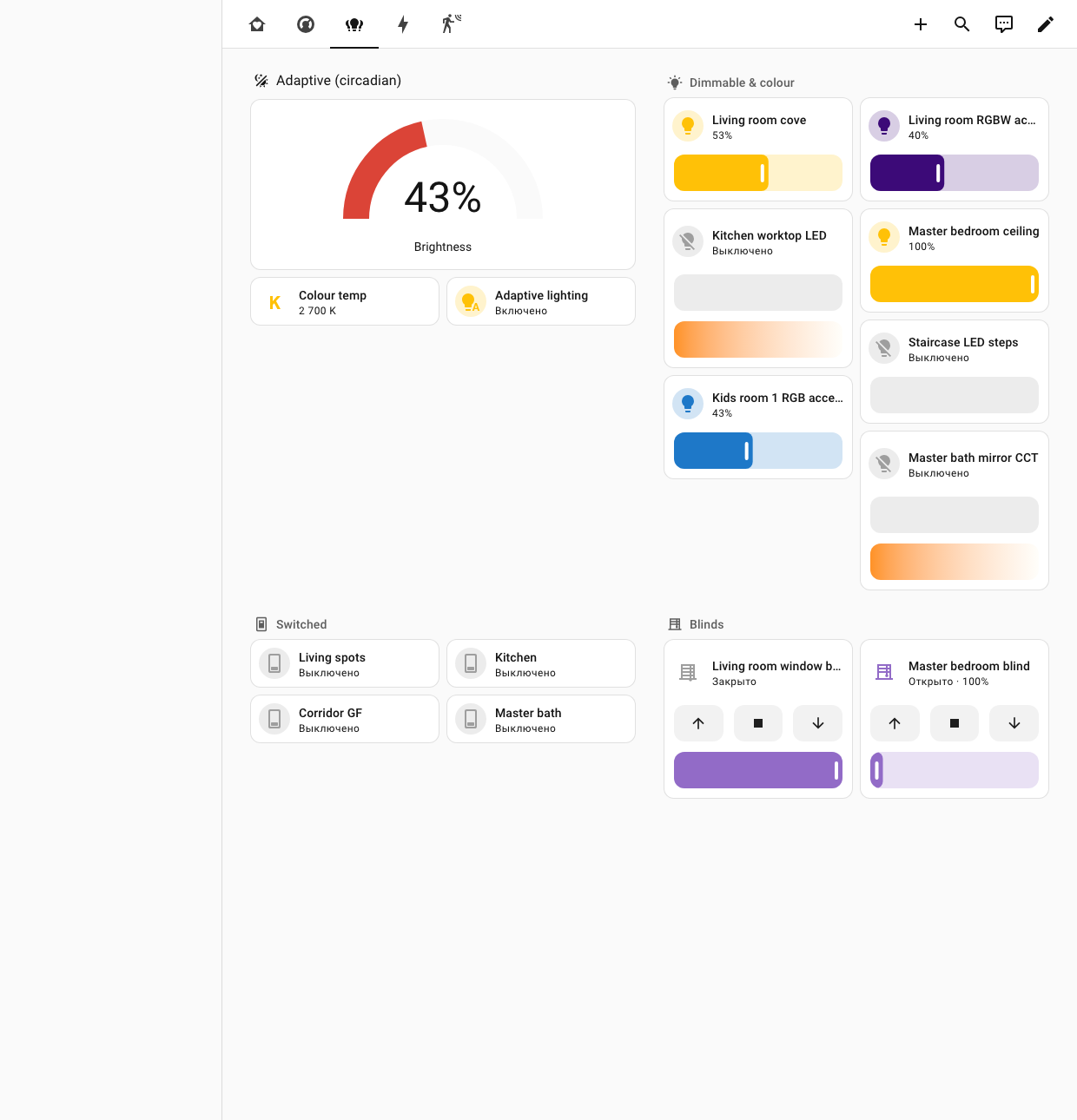
Assembled Home Assistant entities — colour/dimmable lights (RGBW · RGB · CCT + statuses), climate (setpoint · mode · valve), covers, sensors — every entity reading real device state, never assuming it. Anything ambiguous goes to a review list instead of being guessed. Plus a date/time expose block, Matter lint and a KNX IoT (Turtle/RDF) semantic export. Ships with an ops-companion skill (ha-git-backup): real git history of your deployed /config + encrypted offsite backups.

🧩 The foundation — a growing device library

parse_devices_from_project extracts exact vendor object models (object numbers · DPTs · C/R/W/T/U flags · per-channel strides) from the manufacturer application programs inside any .knxproj/.knxprod — deterministic and PII-safe (vendor catalog data only). Point NICKOL_KNX_CATALOG at your catalog and decompose_device answers with the exact model instead of a generic recipe; undeclared DPTs stay honestly unverified. The design methodology is distilled from the KNX Association standard, public manufacturer documentation and the study of real professional as-built ETS projects (anonymised).

The demo house

A whole synthetic home — input to output

A complete worked example ships in the repo (examples/demo-home): a synthetic 2-storey home — living room with fireplace, kitchen, master + 2 kids bedrooms each with ensuite, guest WC, laundry, 2 corridors, staircase. Lighting (switch/dim/CCT/RGBW), underfloor heating + AC, sensors, scenes.

239
group addresses
47
ETS Functions
13
zones
5
deliberate mistakes

The 5 planted mistakes — and what the checks caught

#Planted mistakeCaught?
1Group address with no DPT (Living room CO₂)✅ check_dpt
2Two GAs, same name, different DPT (Kitchen temperature)✅ check_dpt
3Dimmer with on/off status but no brightness status⚠️ not yet — honest limit
4Switch with no status (Guest WC)✅ check_missing_status
5Group address with an empty name✅ check_naming

The tool surfaced its own limitation (#3): the missing-status check asks “does this control have a status?”, not “each expected status type”. Tracked for a future release — found by this very demo.

Live in Home Assistant

The dashboard

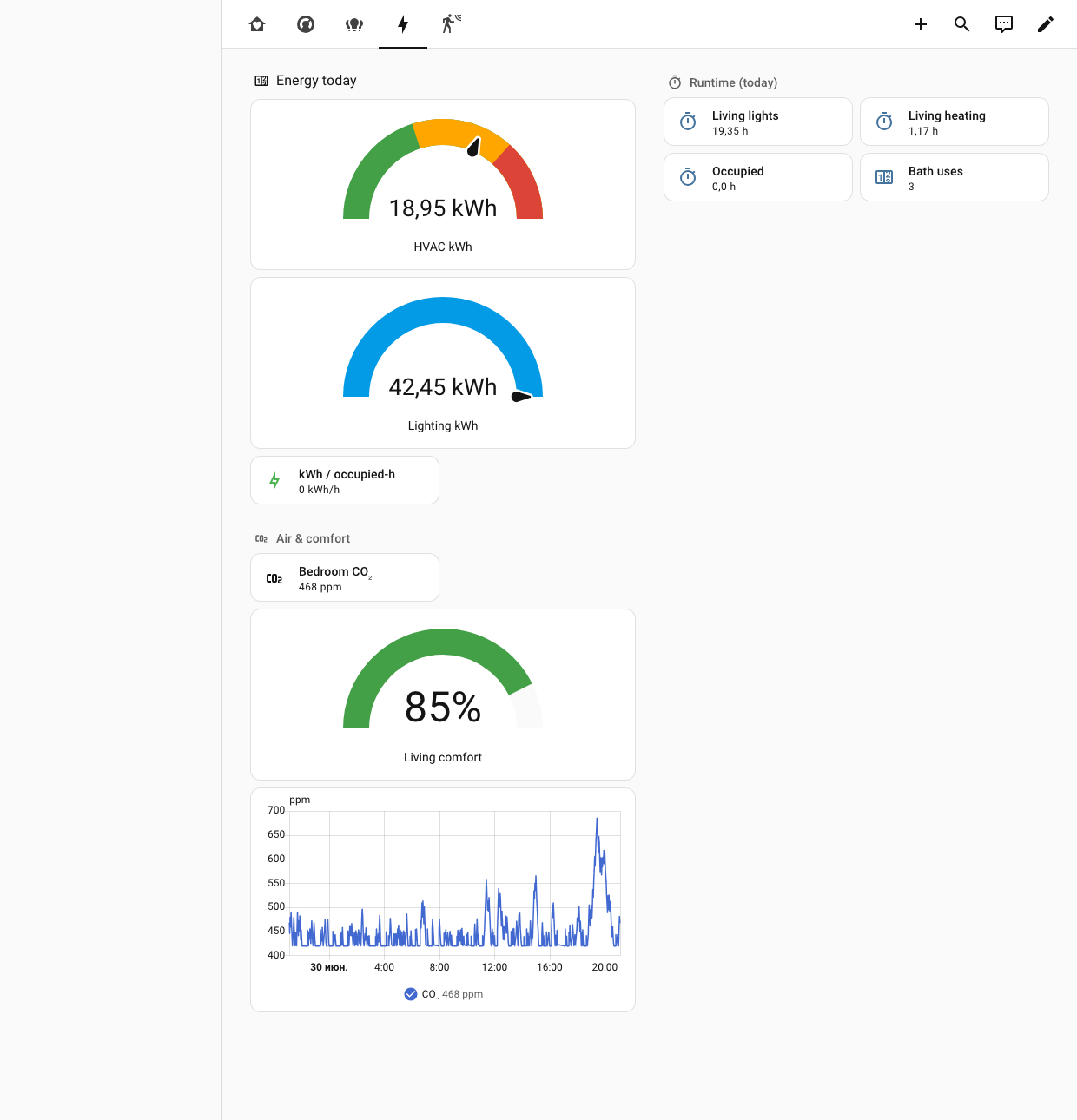
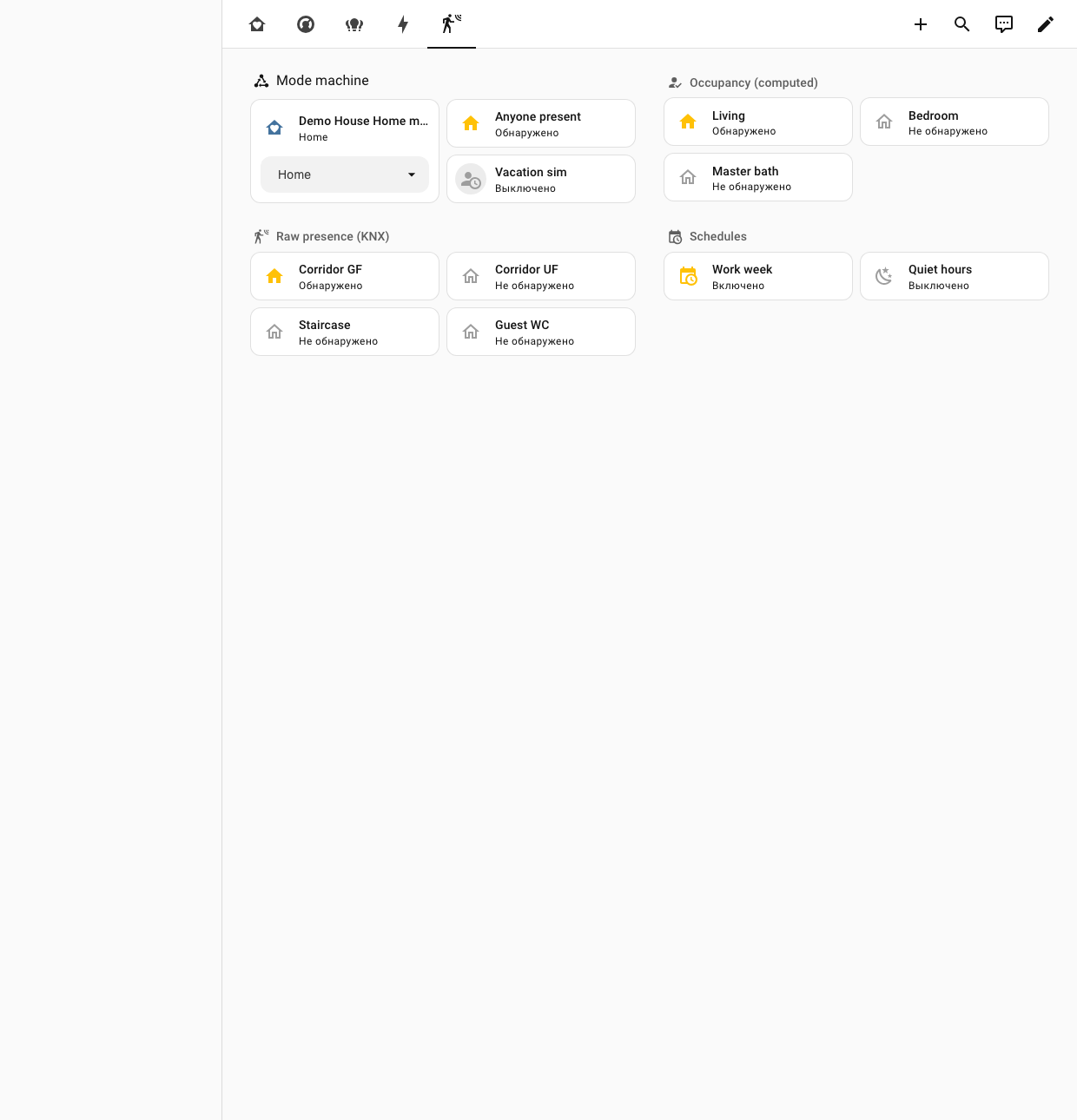
The KNX I/O drives a 5-view Home Assistant dashboard. These are real screenshots from a live Home Assistant running the demo (simulated sensors that drift over time) — now showing the assembled colour lights (RGBW / RGB / CCT) and six floor-heating climate zones the tool generates. Below them, an interactive preview lets you click through the views.
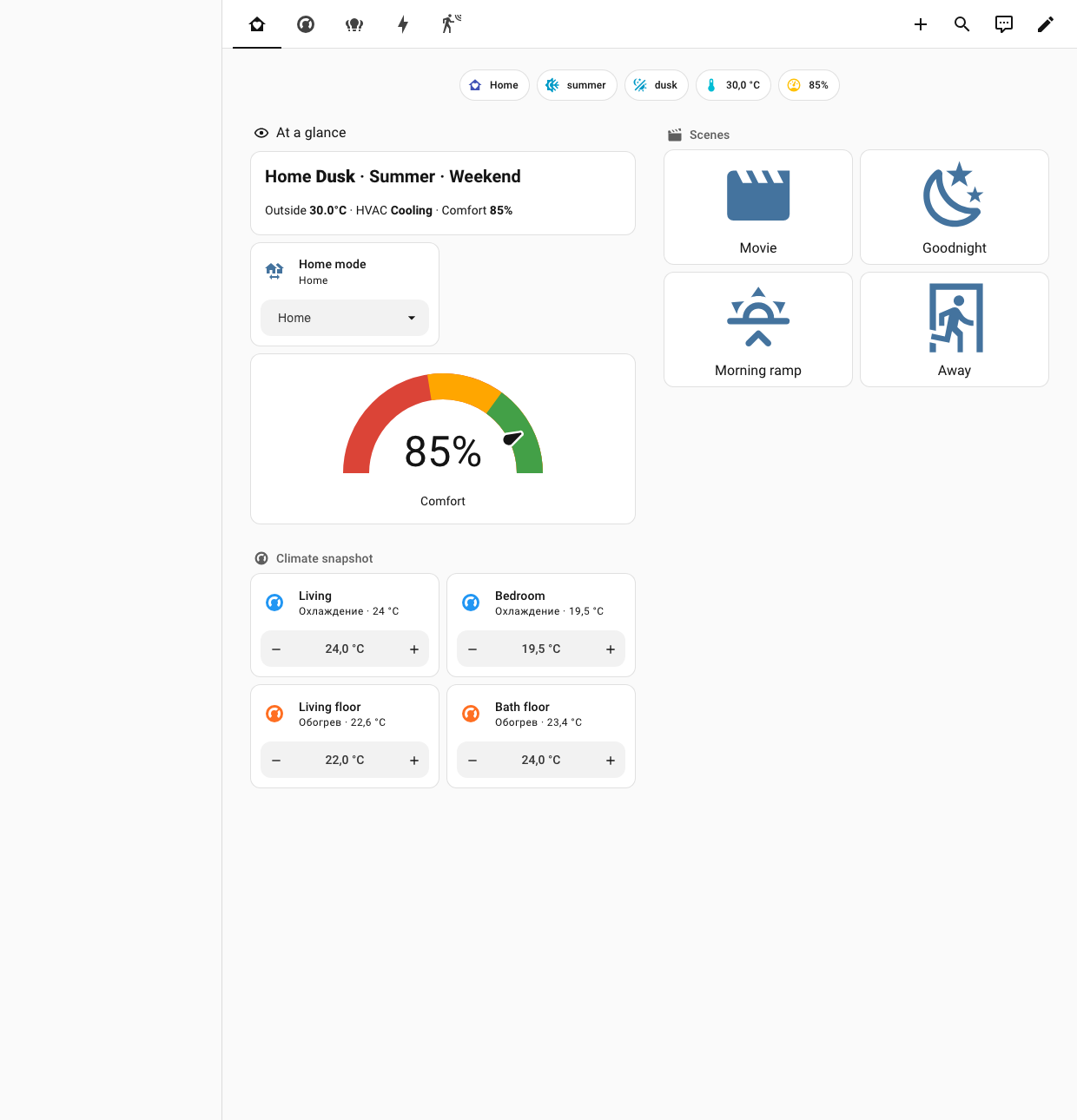
↓ Or explore an interactive preview (mock data)

Demo House
Overview Climate Lighting Energy Presence
Home
Winter
Morning
🌡8.0°C
78%
At a glance
Home
Morning · Winter · Weekday
Outside 8°CHVAC HeatingComfort 78%
78Comfort %
Scenes
🎬
Movie
🌙
Goodnight
🌅
Morning
🏃
Away
Climate snapshot
Living roomHeating
21.4°21.5°
valve 70% · pre-heat 18 min
Master bedroomHeating
19.8°20.0°
night setpoint · occupied
Zones
Living roomHeating
21.4°21.5°
Master bedroomHeating
19.8°20.0°
The brain (computed)
Living target
21.5°C
daypart morningmode Homewinteroccupiedwindow ✓
8-factor setpoint · pre-heat lead 18 min
🔥
Living valve
70%
Trends · 48h
Living · Bedroom · Outdoor
📈
Degree-hours today
142 °C·h
Adaptive (circadian)
62Brightness %
🌡
Colour temp
3400 K
Dimmable & colour
💡
Living cove
🟪
RGBW accent
🔆
Kitchen worktop CCT
Switched & blinds
💡
Living spots
💡
Kitchen
🪟
Living blind
position 35% · slat tilt
Energy today
14HVAC kWh
kWh / occupied-h
0.92
Runtime today
Living lights
3.4 h
Living heating
6.1 h
Occupied
11.2 h
Bath uses
7
Air & comfort
🫧
Bedroom CO₂
680 ppm
CO₂ · 24h
Mode machine
Home mode
Home ▾
👣
Anyone present
Detected
Occupancy (computed)
Living
occupied
Bedroom
clear
Master bath
clear
Corridors
active
Schedules
🗓
Work week
07:00 – 22:30
🌙
Quiet hours
23:00 – 06:30

↑ Interactive preview with mock data · the screenshots above are the real thing, live in Home Assistant.

The brain

Logic that depends on everything

On top of the KNX I/O sits a 5-layer Home Assistant control system — built on native helpers (utility_meter, history_stats, statistics, derivative, trend, threshold, schedule), 22 automations and 3 scripts.

L4 Statistics
energy meters & tariffs · runtime counters · heating degree-hours · KPIs (kWh/occupied-h, comfort)
L3 Lighting
circadian brightness & colour temp · motion/presence (only when dark) · scenes · vacation simulation
L2 Climate
8-factor target setpoint · heat/cool changeover · adaptive pre-heat · window/CO₂ interlocks
L1 Home mode
Home / Away / Night / Eco / Guest / Vacation state machine
L0 Senses
season · daypart (sun) · weekday/weekend · per-zone occupancy · comfort index

⭐ The 8-factor setpoint

A single template folds everything into one number: daypart profile → weekend hold → occupancy setback → home-mode override (Away −3°, Vacation→frost 12°) → seasonal trim / cooling target → window interlock → clamp 12–28 °C.

It's a beta — testers welcome

Try it on your own .knxproj

It's read-only and never touches a bus, so testing is safe. Run it from Claude, point it at your project, and tell us what the report got right — and wrong.